PopUp Pro / Master Modal Module Documentation

PopUp Pro / Master Modal Module

Use this module to create popups on your page that can be triggered automatically or by clicking a button. You can display image, form, or video and custom contents in the popups. It also offers extensive customization options for the launch icon, including size, color, background color, and animation. You can set the background color for the popup when it's launched and the content background color as well.
PopUp Pro / Master Modal Module Documentation

Introduction

Welcome to the PopUp Pro / Master Modal module, your all-in-one solution for creating engaging and attention-grabbing popups on your webpage. With a wide range of customization options and versatile content types, this module is designed to make your web content shine.

Key Features:

  1. Multiple Content Types:

    • Image Popups: Display stunning images to capture your audience's attention.
    • Video Popups: Share videos with your visitors effortlessly.
    • Text Popups: Convey important messages through elegant text overlays.
    • Form Popups: Gather user data with ease.
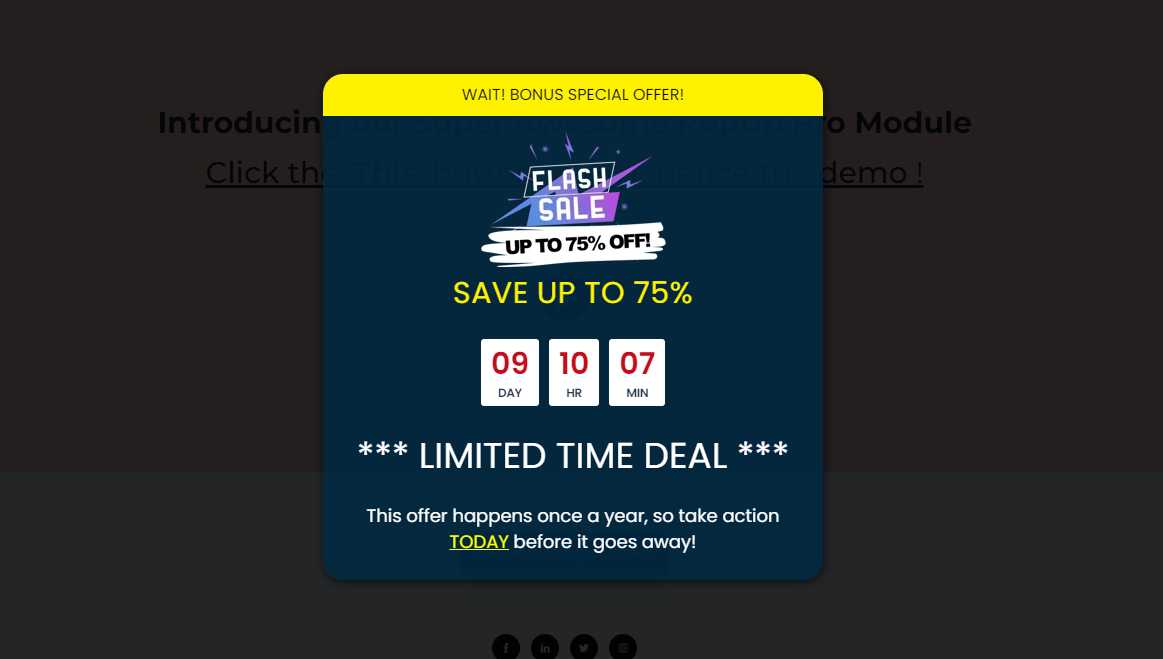
    • Custom Popups: Craft unique popups with rich text and countdown timers.
  2. Customizable Timer:

    • Enable or disable countdown timers to create a sense of urgency.
    • Set a specific date and time for the countdown to end.
  3. Automatic & Manual Launch:

    • Automatically trigger popups on the first visit of the day.
    • Manually launch popups using customized buttons or icons.
  4. Flexible Launch Buttons:

    • Choose between simple text, custom images, or HubSpot icons for your launch buttons.
    • Customize button size, color, background, and play animations.
  5. Countdown Timer Styling:

    • Personalize your countdown timer's appearance with text and background color options.
    • Adjust the background color, width, height, and border radius of your popup area.

Customization at Its Best: With the PopUp Pro / Master Modal module, you have complete control over the look and feel of your popups. Create stunning visual experiences that align with your brand and engage your audience effectively.

Engage, Convert, and Captivate: Whether you want to promote special offers, capture leads, or provide essential information, this module has you covered. Engage your visitors, boost conversions, and leave a lasting impression with captivating popups.

Capture


Launch Feature: Auto and Manual Activation

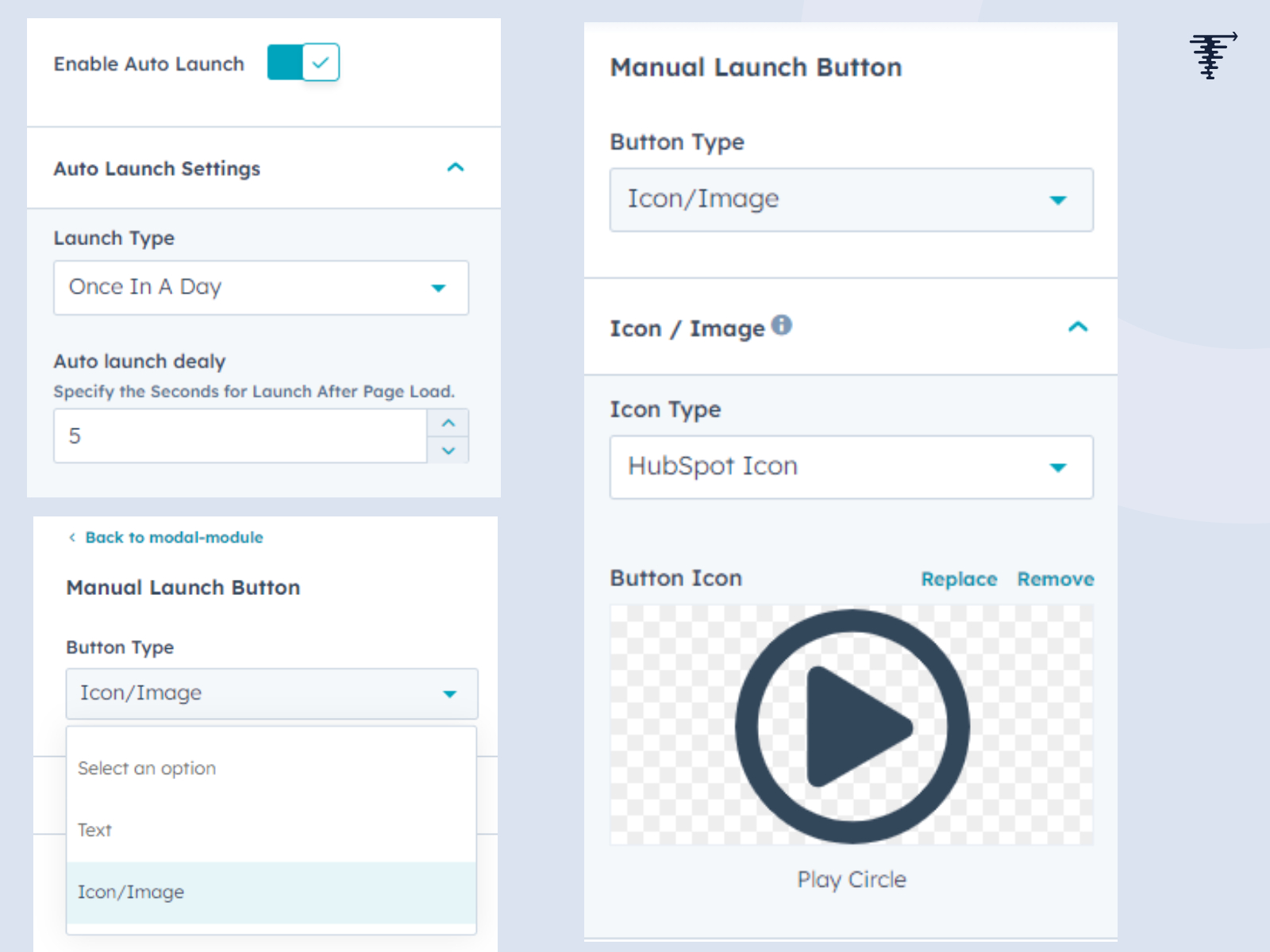
The PopUp Pro / Master Modal module provides two powerful methods for activating your popups: automatic and manual launches. These versatile options give you control over when and how your popups appear to your website visitors.

1. Automatic Launch:

Auto-Launch on First Visit:

  • The automatic launch feature is designed to make a strong first impression.
  • When enabled, your popup will automatically appear on the first visit of the day.
  • This is an excellent way to grab the attention of new visitors and convey essential messages or promotions.

Customizable Auto-Launch:

  • You can set a specific time for the automatic launch to occur.
  • Customize the timing based on your target audience's behavior and preferences.
  • This feature ensures your popups appear at the most effective moment.

2. Manual Launch:

On-Demand User Activation:

  • The manual launch feature empowers you to control when your popups are displayed.
  • Choose to launch the popup by clicking on a designated button or icon.
  • This is a great option for situations where user interaction or engagement is required.

Flexible Launch Button Options:

  • Select the type of launch button that suits your design and goals.
  • Options include simple text, custom images, and HubSpot icons.
  • Customize button attributes such as size, color, background, and animation effects.

When to Use Auto and Manual Launch:

  1. Auto-Launch: Ideal for delivering time-sensitive information, promotions, or welcoming new visitors with a friendly greeting. It maximizes the chances of engaging your audience right from the start.

  2. Manual Launch: Perfect for interactive content, user-specific actions, or giving visitors the freedom to decide when they want to engage with your popups. Use it when you want to guide the user's experience intentionally.

listing-main


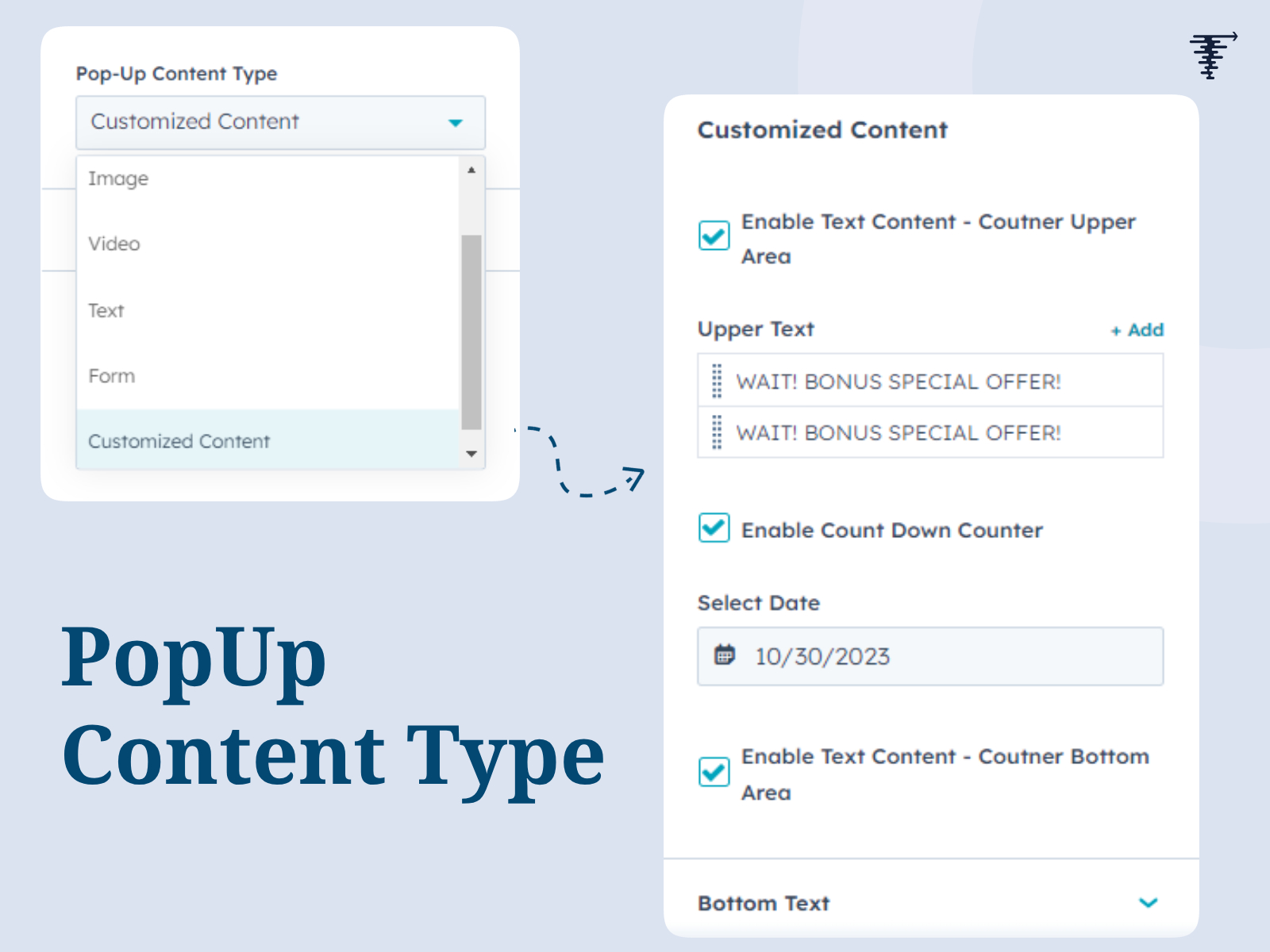
Popup Content Types: Versatile Engagement Solutions

The PopUp Pro / Master Modal module offers an array of versatile popup content types, allowing you to engage your website visitors effectively. These options enable you to choose the right format for your message or promotion. Here's a detailed breakdown of each content type:

1. Single Image Popups:

  • Engage your audience visually with stunning image popups.
  • Use single images to convey your brand, products, or promotions in an eye-catching and memorable way.
  • Ideal for displaying product showcases, event banners, or visually impactful messages.

2. Video Popups:

  • Make a dynamic impression with video content.
  • You can embed YouTube videos or upload custom videos directly into the popup.
  • Perfect for video tutorials, promotional clips, or any content that comes to life through video.

3. Text Popups:

  • Deliver important information or messages through text-based popups.
  • Text popups provide a straightforward way to convey content such as announcements, event details, or simple messages.
  • Customize text styles and formatting to align with your branding.

4. Form Popups:

  • Interact with your visitors through form-based popups.
  • Easily integrate HubSpot forms, enabling lead generation and data collection.
  • Capture user details, feedback, and inquiries with these effective forms.

5. Custom Content Popups:

  • Create entirely customized popups to suit your unique needs.
  • The custom content type gives you the freedom to design popups with rich media, texts, and interactive elements.
  • Use it for special promotions, engaging stories, or creating unique user experiences.

Additional Popup Content Features:

  • Text Overlay on Timer (Top Area):

    • Customize the top area of the timer with text overlay.
    • This feature allows you to reinforce your message, brand, or promotions by overlaying text on the countdown timer.
  • Countdown Timer:

    • Add urgency and excitement to your popups with countdown timers.
    • You can enable or disable countdown timers to suit different marketing goals.
    • Specify the countdown date to ensure accurate timing for your promotions.
  • Text Overlay on Timer (Bottom Area):

    • Further enhance your popup's message by adding text overlay to the bottom area of the timer.
    • This area can repeat text or provide additional information for a comprehensive user experience.

When to Use Each Popup Content Type:

  1. Single Image Popups: Use these when you want to create a visually striking impression or showcase products, events, or promotions with high-quality imagery.

  2. Video Popups: Ideal for engaging visitors with dynamic content, such as tutorials, promotional videos, and storytelling.

  3. Text Popups: Perfect for conveying essential information, announcements, or providing straightforward messages.

  4. Form Popups: Use these to collect user data, feedback, inquiries, or leads through integrated HubSpot forms.

  5. Custom Content Popups: When you need a unique, tailored popup to match your brand identity or tell a specific story.

popup-content-type


Styling Features: Elevate Your Popup Design

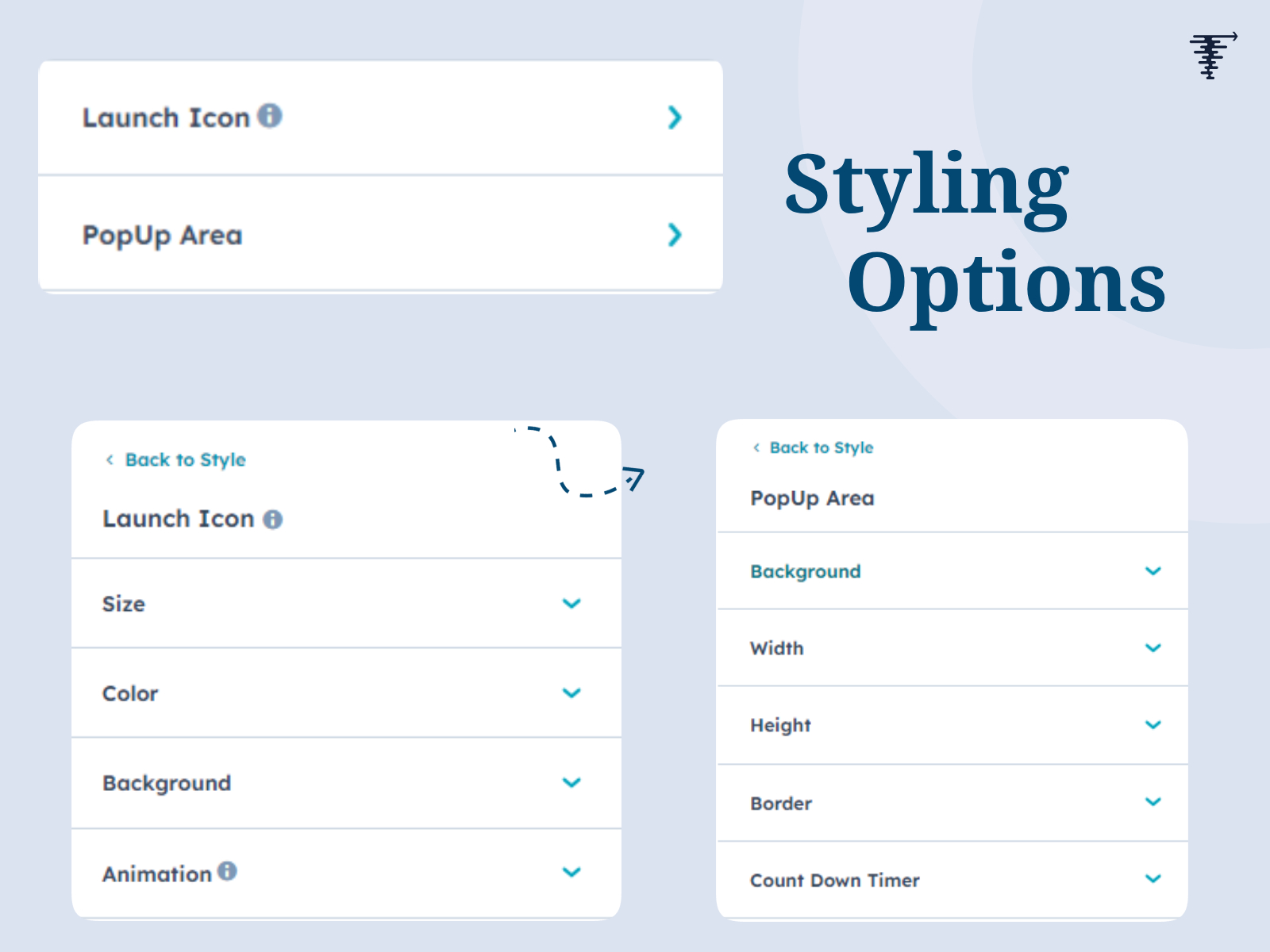
The PopUp Pro / Master Modal module empowers you with an array of styling features, allowing you to craft popups that align seamlessly with your brand's identity and messaging. Here, we delve into the various styling options that make your popups visually captivating and engaging:

1. Launch Icon Styling:

  • Customize the launch icon's appearance, ensuring it stands out on your web page.
  • Options include modifying the icon's size, color, and background color to match your brand's aesthetics.

2. Launch Icon Animation:

  • Add an extra layer of visual appeal with launch icon animations.
  • You can choose to enable or disable animations, ensuring a dynamic and eye-catching popup experience for your audience.

3. Launch Icon Animation Color:

  • Tailor the animation's color to coordinate with your brand's color palette.
  • This fine-tuned control allows you to maintain brand consistency throughout the popup experience.

4. Popup Area Styling:

  • Craft the perfect ambiance for your popup area with extensive styling options.
  • Modify background colors, dimensions, and border radius to create a visually pleasing and seamless fit within your web page.

5. Countdown Timer Styling:

  • Enhance the countdown timer's visual appeal and readability.
  • Customize the text color, background color, and counter table color to align with your brand's design principles.

How to Leverage These Styling Features:

  1. Launch Icon Styling: Utilize icon size adjustments to ensure the launch button grabs your visitors' attention. Harmonize the icon's color with your brand identity and choose a complementary background color for a polished look.

  2. Launch Icon Animation: Make a bold impression by enabling animations for your launch icon. Capture your audience's focus with an engaging visual effect, or opt for a static icon if your design demands simplicity.

  3. Launch Icon Animation Color: Maintain consistency in your popup's design by customizing the animation color. Ensure it complements your brand's primary color palette for a cohesive appearance.

  4. Popup Area Styling: Create a seamless and visually pleasing integration of the popup within your web page. Adjust background colors to harmonize with your website's overall theme, modify dimensions to suit your content, and add border radius for a modern finish.

  5. Countdown Timer Styling: Elevate the urgency and appeal of your popup by optimizing countdown timer settings. Tailor text and background colors to resonate with your brand's aesthetic, ensuring the timer seamlessly integrates into the design.

styling-options-for-popup


Conclusion:

The PopUp Pro / Master Modal module is your gateway to crafting captivating popups for your website. With versatile content options, flexible launch methods, and extensive styling features, you can engage your audience like never before. From automated displays to manual launches, this module offers the tools to leave a lasting impression. Create popups that align with your brand's identity and enhance user experiences, all with the ease of this dynamic module. Make your website truly pop with PopUp Pro.